Azure Tag Governance with Terraform and Automated Compliance Monitoring


Terraform module for Azure tag governance with automated compliance monitoring
Why I built this module
This module came from a real pain point I kept seeing: everyone talks about tagging, but in practice environments end up with gaps, inconsistent standards, and very little visibility into what is actually compliant.
At first, I designed it to monitor the Cloud Adoption Framework (CAF) baseline tags. Over time, it became clear that every business has its own context. So I evolved the module to support both worlds:
- follow the CAF baseline when that is the goal;
- support custom business-specific standards;
- combine both through inputs, without losing consistency.
What I built
On deployment, the module provisions:
azurerm_resource_group.mainto host the workbook;azurerm_application_insights_workbook.mainto publish the workbook;random_uuid.mainto generate a unique workbook name.
The result is an Azure Monitor Workbook with 3 tabs that work together:
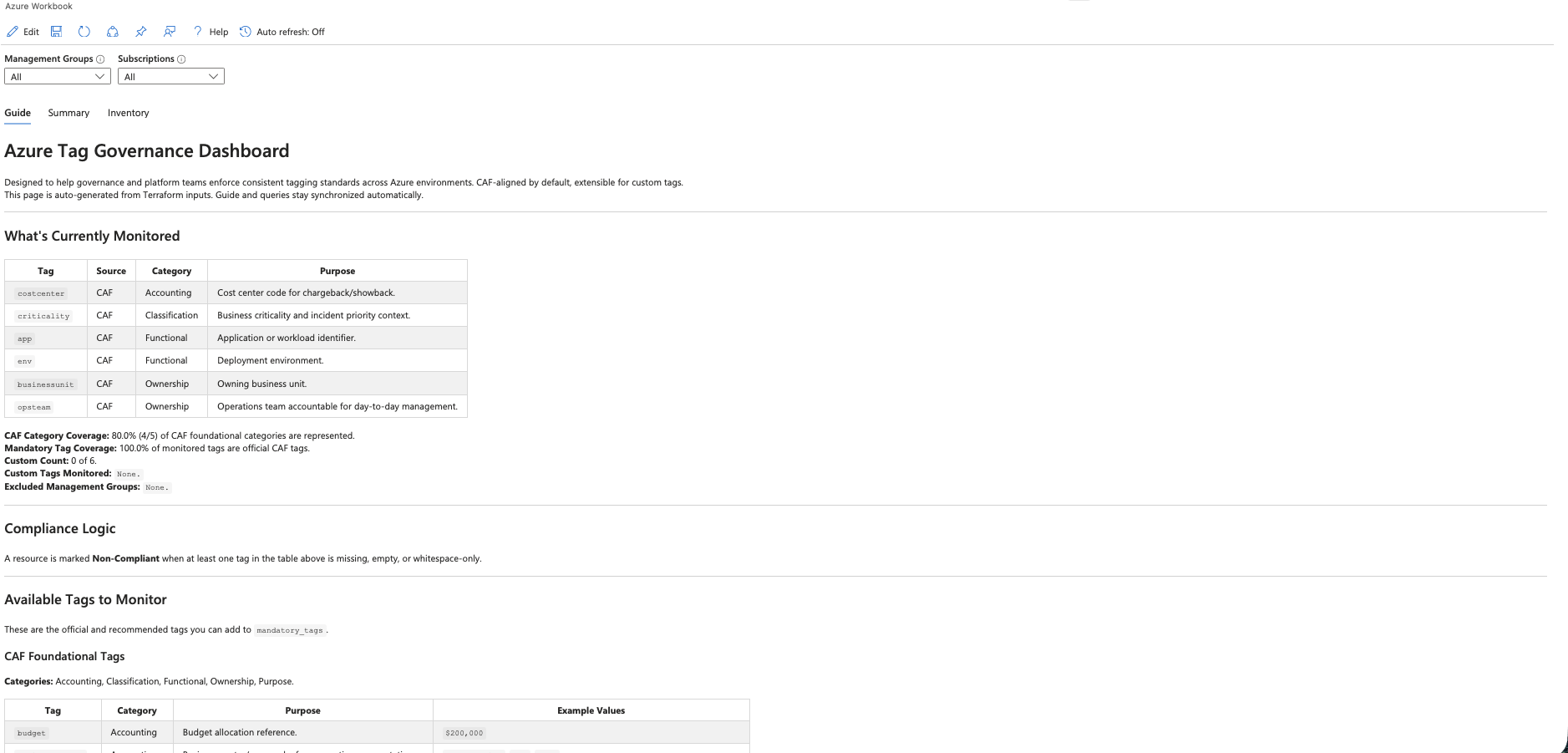
- Guide: explains which tags are monitored, where they come from (CAF or custom), and your current coverage;
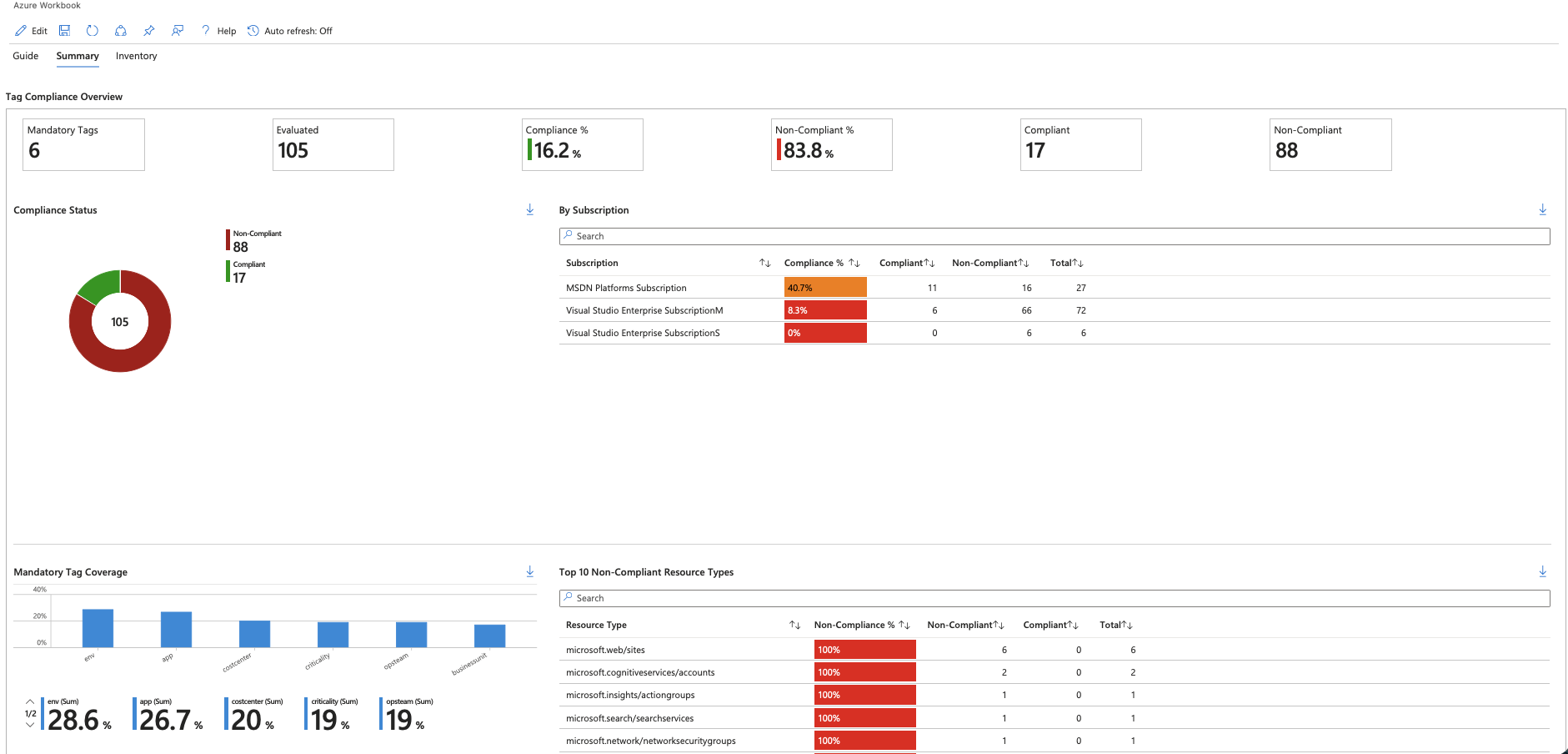
- Summary: shows compliance/non-compliance KPIs, per-tag coverage, and per-subscription views;
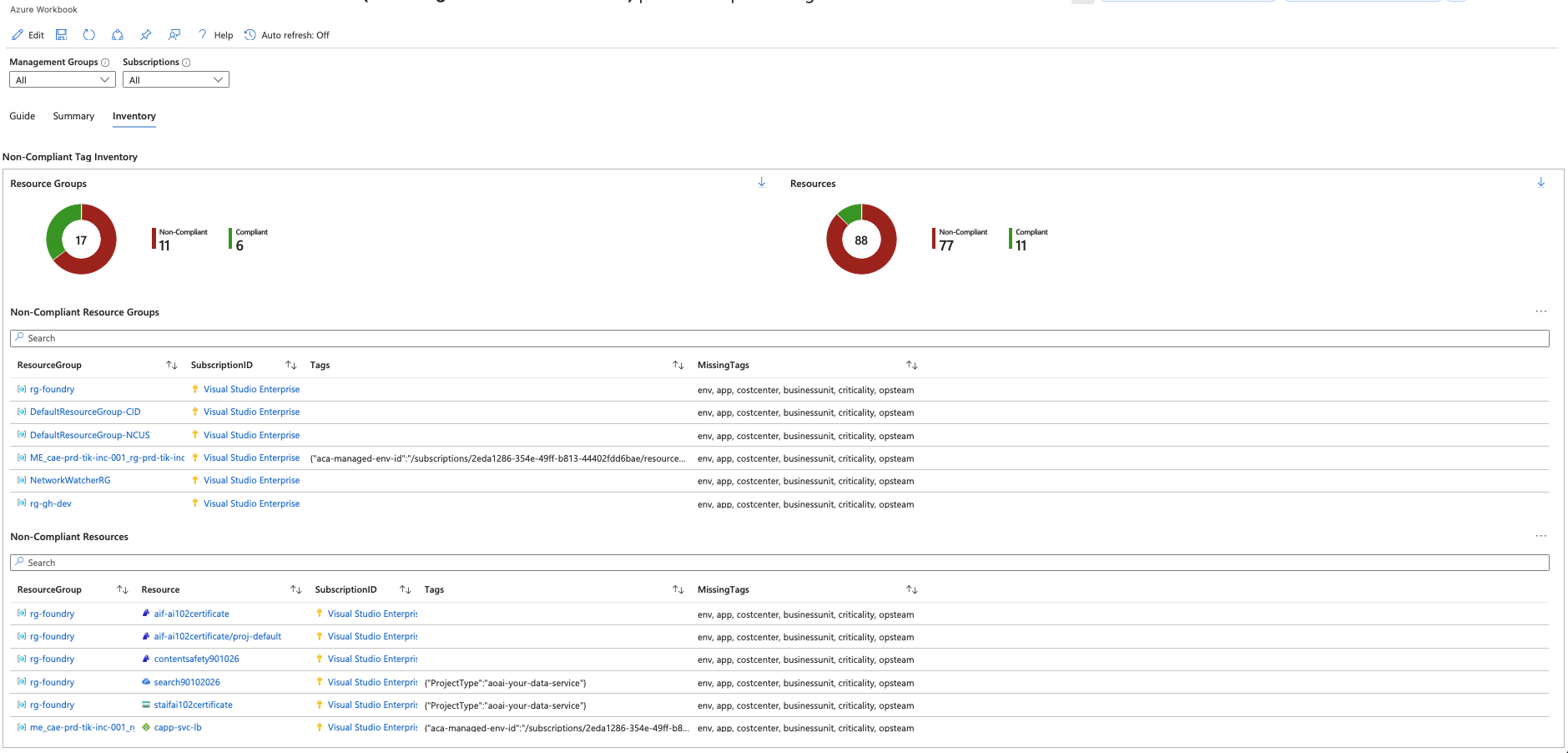
- Inventory: provides operational detail for non-compliant resources and which tags are missing on each one.
How I designed the architecture
My idea was simple: Terraform-declared rules should become automated visualization, without manual workbook maintenance.
Flow:
- I receive governance rules via inputs (
mandatory_tags, catalogs, and excluded management groups). - I normalize and validate tags (case-insensitive keys, case-sensitive values).
- I generate KQL variables to build compliance filters, missing-tag inventory logic, and optional management group exclusions.
- I render query templates plus the workbook JSON template.
- I publish the workbook in Azure.
In practice: change input, change dashboard.
Code snippets that make the difference
These are some of the code sections I consider most important in the module design.
1) Workbook rendering with KQL templates
This snippet shows how the workbook receives queries that are mostly rendered from KQL templates (templatefile), plus one static KQL file (file) for a fixed KPI. The idea is to keep workbook JSON decoupled from governance logic.
1
2
3
4
5
6
7
8
9
10
11
12
13
14
15
16
17
18
19
20
21
22
23
24
25
26
27
28
29
30
31
32
33
34
35
36
37
38
39
resource "azurerm_application_insights_workbook" "main" {
    resource_group_name = azurerm_resource_group.main.name
    location            = azurerm_resource_group.main.location
    name                = random_uuid.main.result

    display_name = var.workbook_display_name
    source_id    = "azure monitor"
    category     = "workbook"

    data_json = templatefile("${path.module}/templates/workbook-tag-governance.json.tpl", {
      guide_intro_markdown = local.guide_intro_markdown

      # Parameters (no tag logic - plain file reads)
      query_param_mg  = templatefile("${path.module}/templates/queries/param-mg.kql", local.kql_vars)
      query_param_sub = templatefile("${path.module}/templates/queries/param-sub.kql", local.kql_vars)

      # Summary Tab - KPIs
      query_kpi_mandatory_tags    = templatefile("${path.module}/templates/queries/kpi-mandatory-tags.kql.tpl", local.kql_vars)
      query_kpi_evaluated         = file("${path.module}/templates/queries/kpi-evaluated.kql")
      query_kpi_compliance_pct    = templatefile("${path.module}/templates/queries/kpi-compliance-pct.kql.tpl", local.kql_vars)
      query_kpi_noncompliance_pct = templatefile("${path.module}/templates/queries/kpi-noncompliance-pct.kql.tpl", local.kql_vars)
      query_kpi_compliant         = templatefile("${path.module}/templates/queries/kpi-compliant.kql.tpl", local.kql_vars)
      query_kpi_noncompliant      = templatefile("${path.module}/templates/queries/kpi-noncompliant.kql.tpl", local.kql_vars)

      # Summary Tab - Charts & Tables
      query_chart_compliance_summary              = templatefile("${path.module}/templates/queries/chart-compliance-summary.kql.tpl", local.kql_vars)
      query_table_compliance_by_subscription      = templatefile("${path.module}/templates/queries/table-compliance-by-subscription.kql.tpl", local.kql_vars)
      query_chart_tag_coverage                    = templatefile("${path.module}/templates/queries/chart-tag-coverage.kql.tpl", local.kql_vars)
      query_table_top_noncompliant_resource_types = templatefile("${path.module}/templates/queries/table-top-noncompliant-resource-types.kql.tpl", local.kql_vars)

      # Inventory Tab - Pie Charts
      query_piechart_rg_compliance       = templatefile("${path.module}/templates/queries/piechart-rg-compliance.kql.tpl", local.kql_vars)
      query_piechart_resource_compliance = templatefile("${path.module}/templates/queries/piechart-resource-compliance.kql.tpl", local.kql_vars)

      # Inventory Tab - Tables
      query_table_noncompliant_rg        = templatefile("${path.module}/templates/queries/table-noncompliant-rg.kql.tpl", local.kql_vars)
      query_table_noncompliant_resources = templatefile("${path.module}/templates/queries/table-noncompliant-resources.kql.tpl", local.kql_vars)
    })
}
2) Input logic with strong validation
This validation block enforces a minimum governance baseline and prevents invalid input from reaching deployment.
1
2
3
4
5
6
7
8
9
10
11
12
13
14
15
16
17
18
19
20
21
22
variable "mandatory_tags" {
    type    = list(string)
    default = ["env", "app", "costcenter", "businessunit", "criticality", "opsteam"]

  validation {
    condition     = length(var.mandatory_tags) > 0 && alltrue([for t in var.mandatory_tags : trimspace(t) != ""])
    error_message = "mandatory_tags must contain at least one non-empty tag key."
  }

  validation {
    condition     = length(distinct([for t in var.mandatory_tags : lower(trimspace(t))])) == length(var.mandatory_tags)
    error_message = "mandatory_tags must not contain duplicate tag keys (case-insensitive)."
  }

  validation {
    condition = alltrue([
      for t in var.mandatory_tags :
      length(trimspace(t)) <= 512 && length(regexall("[<>%&\\\\?/]", trimspace(t))) == 0
    ])
    error_message = "Each mandatory tag key must be <= 512 characters and must not contain: <, >, %, &, \\, ?, /."
  }
}
3) Dynamic KQL built from mandatory_tags
This is where rules connect to observability. Instead of hardcoding, the module derives the tag-monitoring logic from mandatory_tags and turns it into reusable KQL fragments.
1
2
3
4
5
6
7
8
9
10
11
12
13
14
15
16
17
18
19
20
21
22
23
24
25
26
27
28
29
30
31
32
33
34
35
36
37
38
39
locals {
  mandatory_tags_normalized = [
    for tag in var.mandatory_tags : lower(trimspace(tag))
  ]

  # Base non-compliance logic: tag missing, empty, or whitespace-only.
  kql_noncompliant_filter = join(" or ", [
    for tag in local.mandatory_tags_normalized :
    "isempty(trim(' ', tostring(tags['${tag}'])))"
  ])

  # Dynamic fragments used by Inventory tables/charts.
  kql_tag_dynamic_array = "dynamic([${join(",", [for t in local.mandatory_tags_normalized : "'${t}'"])}])"

  kql_tag_extends = join("\n", [
    for i, tag in local.mandatory_tags_normalized :
    "    | extend Tag${i + 1}Missing = isempty(trim(' ', tostring(tags['${tag}'])))"
  ])

  kql_missing_tags_concat = "strcat_array(array_concat(${join(",", [
    for i, tag in local.mandatory_tags_normalized :
    "iff(Tag${i + 1}Missing, dynamic(['${tag}']), dynamic([]))"
  ])}), ', ')"

  kql_noncompliant_or_tags = join(" or ", [
    for i in range(length(local.mandatory_tags_normalized)) :
    "Tag${i + 1}Missing"
  ])

  # Tag-driven KQL fragments consumed by the workbook queries.
  kql_vars = {
    noncompliant_filter  = local.kql_noncompliant_filter
    tag_dynamic_array    = local.kql_tag_dynamic_array
    tag_extends          = local.kql_tag_extends
    missing_tags_concat  = local.kql_missing_tags_concat
    noncompliant_or_tags = local.kql_noncompliant_or_tags
    mandatory_tags_count = length(local.mandatory_tags_normalized)
  }
}
This is the tag-driven core of the locals block. In the full module, adjacent locals also handle optional scope refinements such as excluded management groups.
Implementation note: for maximum query safety, if you ever relax tag-key validations in the future, keep escaping single quotes before injecting tag keys into KQL string literals.
4) How base resources are created
1
2
3
4
5
6
7
resource "random_uuid" "main" {}

resource "azurerm_resource_group" "main" {
    name     = var.resource_group_name
    location = var.location
    tags     = var.tags
}
These blocks are simple but important: they make the module reusable with naming, region, and tagging controlled by inputs.
Important technical decision: KQL with Azure Resource Graph and Policy are complementary
This point was key in the module design, especially for brownfield environments.
- Azure Policy Compliance is excellent for normative/compliance status.
- Azure Resource Graph with KQL is excellent for current operational status.
Real-world example of noise this avoids: a resource can show as Exempt in Policy and still be missing required tags. With KQL over Azure Resource Graph, I can see the actual tag state at that moment and prioritize remediation more accurately.
How I use this in practice:
- Policy for formal adherence and auditability;
- Workbook with KQL + Azure Resource Graph for continuous diagnostics and operational action;
- both together for higher governance maturity.
What kind of insights this workbook delivers
For me, the main value is turning observability into decisions.
Per-tag coverage:
- quickly shows where the bottleneck is (financial, ownership, risk).
Management group and subscription filtering:
- highlights maturity differences across domains and helps spot onboarding gaps.
Actionable inventory:
- generates an objective remediation backlog focused on missing tags.
Value it brought
- Less time spent on manual tag audits.
- Better clarity for platform, security, FinOps, and operations teams.
- Better remediation prioritization in legacy environments.
- More confidence to evolve governance without losing flexibility.
When it makes sense to use
When you want to move from reactive governance to a continuous process, with a clear baseline and the ability to adapt rules to business context.
Images
Guide
Summary
Inventory
Logical architecture

References:
Repository
Terraform Registry Module
Use tags to organize your Azure resources and management hierarchy
Azure Resource Graph overview
Azure Policy overview